
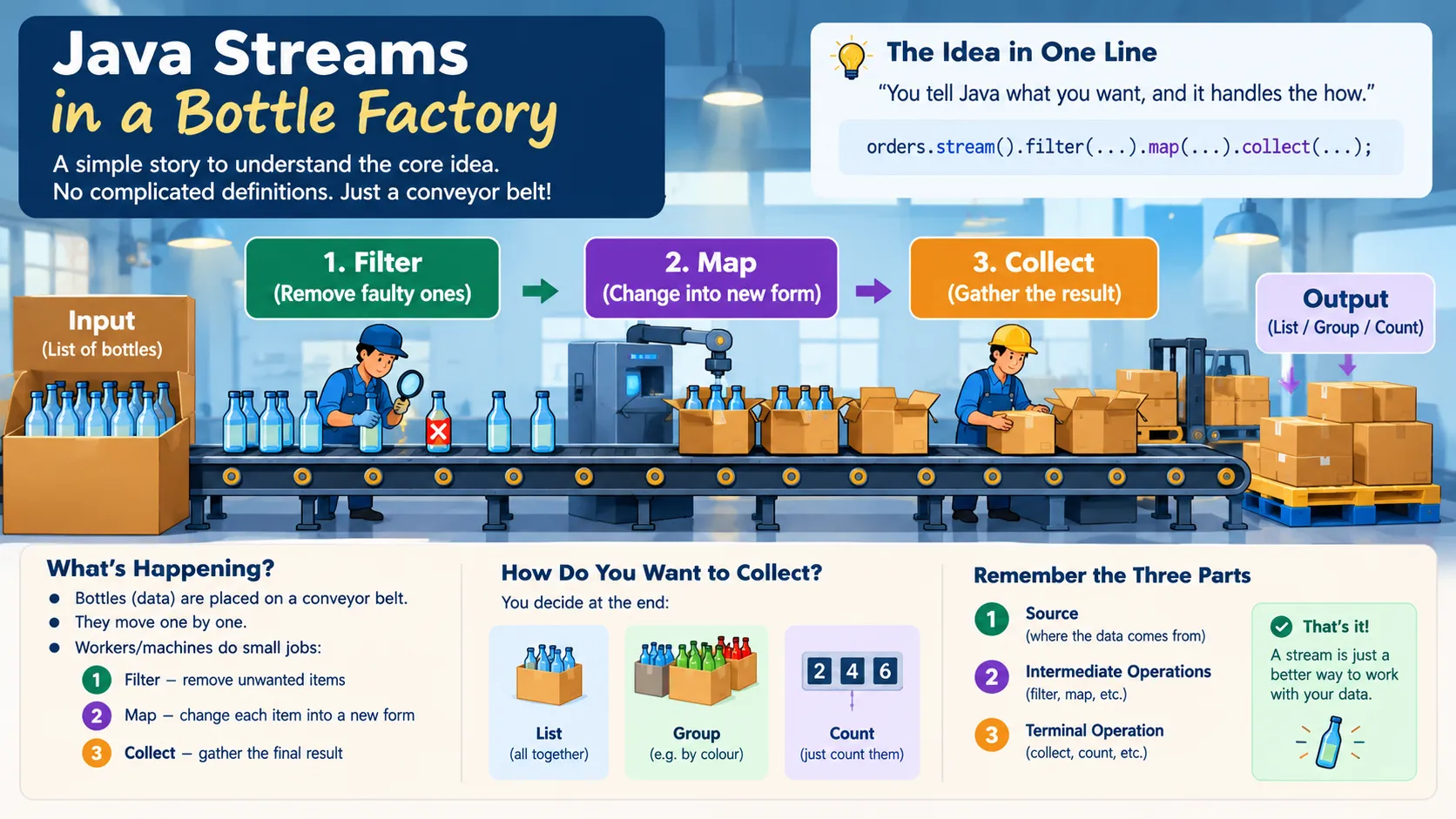
“Loops make us write the how, but streams let us write the what, turning messy code into a clean chain of small jobs.”
Let's Understand Java Streams in the Simplest Way
A beginner-friendly guide to Java Streams, told as one simple story: a soft drink factory.
What You Will Learn
In this blog, we will learn Java Streams using one story only: a soft drink factory with a conveyor belt.
Here is our plan:
- The story: a soft drink factory with a problem, and a conveyor belt that fixes it
- The old way: the same story written in Java with a
forloop - The new way: the same story written with a stream
- What a stream really is (the simple technical definition)
- The three parts of a stream, and why the last part is a must
- Two golden rules
- Grouping and counting bottles by flavour
- The full code in one place, ready to run
Step 1: Let’s Understand It in a Story
The factory and its problem
Imagine you run a soft drink company. All day long, bottles come to you. Here is your job with these bottles:
- Check each bottle and remove the faulty ones (cracked or damaged)
- Add a label to every good bottle
- Put all the labelled bottles in a box
- Sometimes, group the bottles by flavour: orange, cola, and lemon
How do you do this today? By hand. You pick up one bottle. You check it. You label it. You put it in the box. Then you pick up the next bottle and do everything again.
This is fine for 10 bottles. But with thousands of bottles, it becomes slow and messy:
- You must remember every small step yourself
- It is easy to skip a step or mix up the order
- If the job changes (for example, “now also group by flavour”), you must change your whole routine
- You spend your energy on how to do each small step, instead of thinking about what you actually want
This is exactly how the old for loop works in Java. Keep this in mind. We will see it in code very soon.
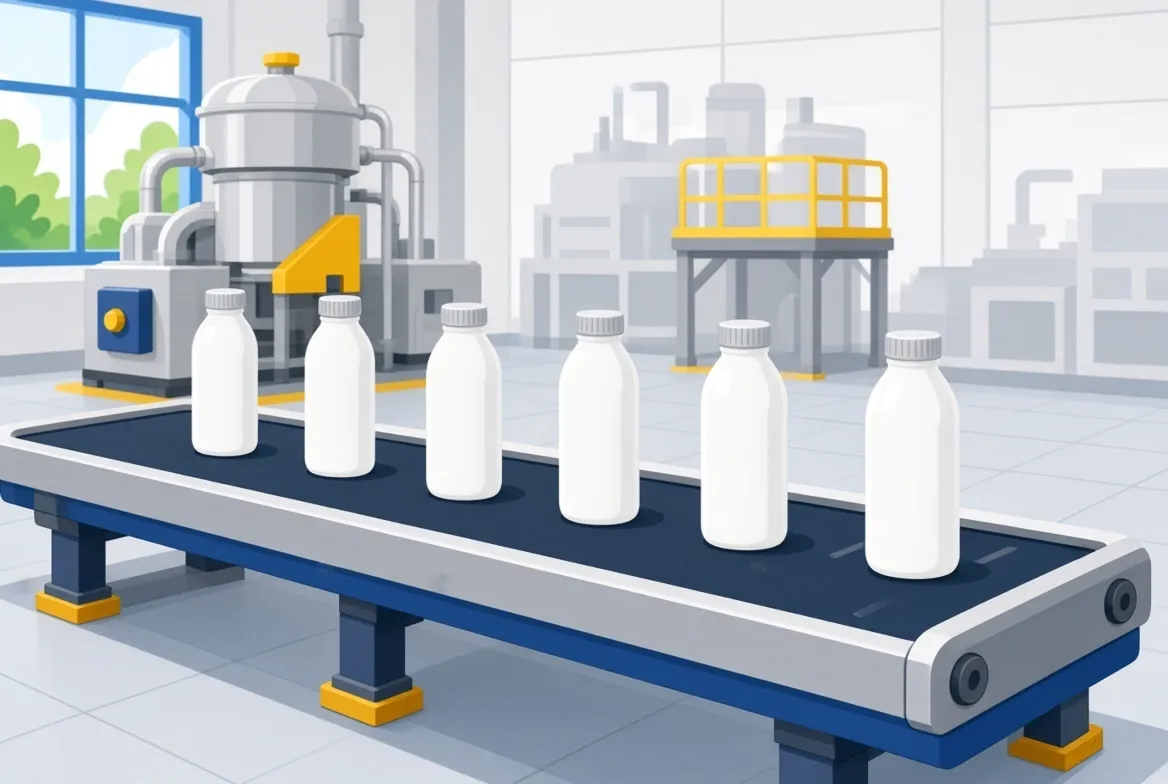
The fix: a conveyor belt
One day, a friend visits your factory. He says, “Let me fix this for you. I will give you a conveyor belt.”
You ask, “What is a conveyor belt?”
He says, “It is a moving belt. You put your bottles at one end, and the belt carries them forward, one by one, past a line of workers. Each worker does only one small job.”
You ask, “And how does it fix my problem?”
He says, “You stop doing everything yourself. You decide the jobs once, give each job to a worker, and let the belt do the moving.”
Setting up the belt: three things
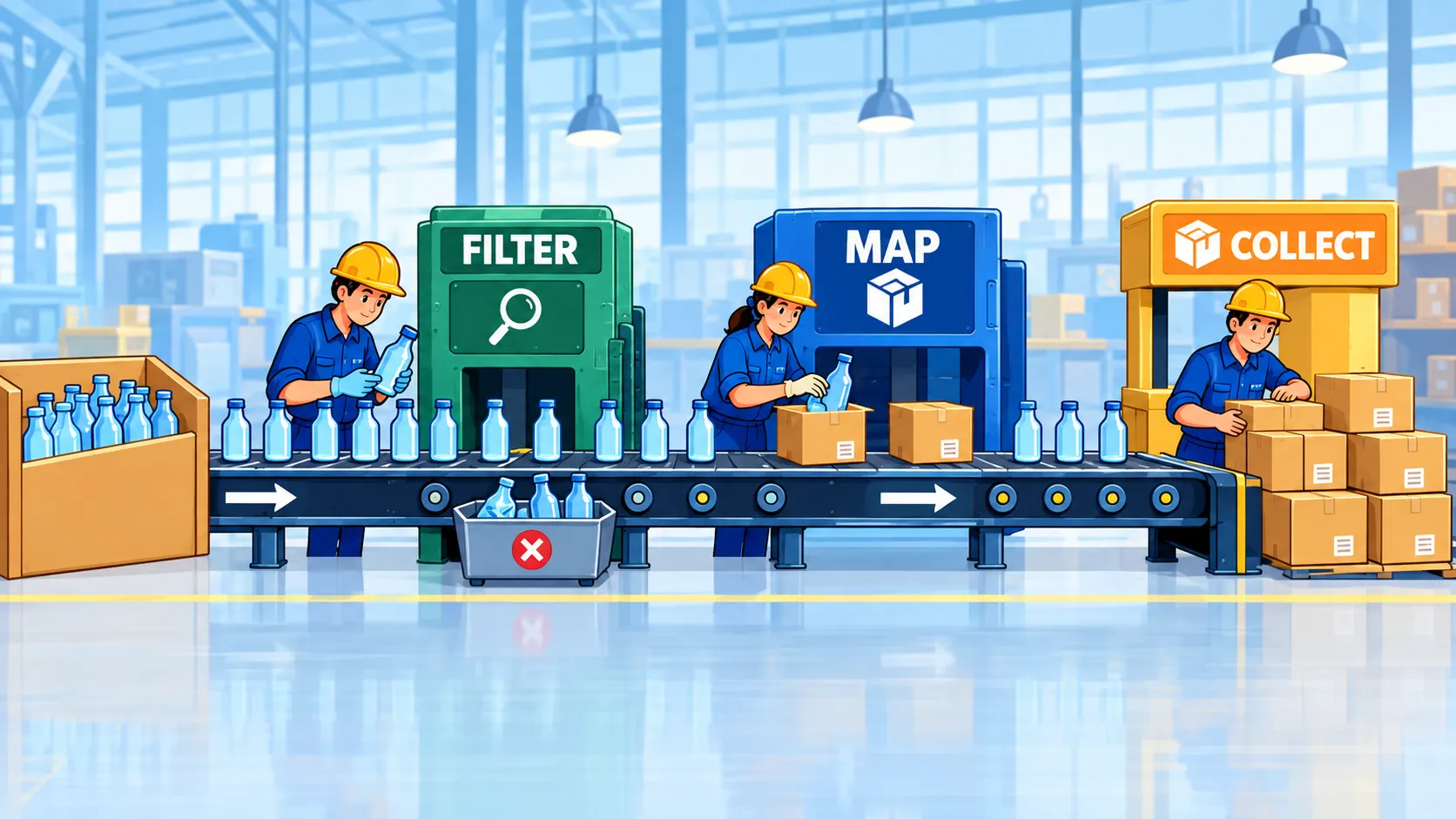
Before you press Start, you must set up three things:
- Put your bottles on the belt. This is where all the bottles begin. In Java, we call this the source.
- Give one job to each worker along the belt. One worker removes the faulty bottles. Another worker adds the label. In Java, we call these intermediate operations.
- Place one person at the end of the belt. This person collects the finished bottles and packs them into a box. In Java, we call this the terminal operation.
When all three are ready, you press the Start button.
What if a worker is missing in the middle? Say nobody is checking for faulty bottles. Then the damaged bottles slip through, and your box has wrong data. So every job must be given to someone before the belt starts.
Why do you need a person at the end?
Think about this. You put the bottles on the belt. You place all the workers. But nobody is standing at the end to collect. What happens?
The bottles reach the end, and no one takes them. The checking and the labelling are all wasted. There is no point in having the belt.
You added the belt for one purpose: to get a final result. Someone must collect it. So before you start, you must decide what you want at the end, for example, “put all the good bottles in a box.” Once this is decided, the belt knows its goal. Only then does it start.
Java works in the same way. We will see how, very soon.
Step 2: The Old Way, Same Story in Code
Now let’s see the same factory in Java. First, we need to describe a bottle.
In Java, each bottle becomes an object. An object is just a small package of information. Our bottle holds four things: an id, a flavour, whether it is damaged, and whether it is filled with drink.
The flavour comes from a fixed list of choices. In Java, a fixed list of choices is called an enum. We write it in its own file:
// File: Flavour.java
public enum Flavour {
    ORANGE, COLA, LEMON
}
Here is the bottle, also in its own file:
// File: Bottle.java
public class Bottle {

    private int id;
    private Flavour flavour;
    private boolean damaged;
    private boolean filled;

    public Bottle(int id, Flavour flavour, boolean damaged) {
        this.id = id;
        this.flavour = flavour;
        this.damaged = damaged;
        this.filled = true;   // every bottle starts full
    }

    public int getId() { return id; }
    public Flavour getFlavour() { return flavour; }
    public boolean isDamaged() { return damaged; }
    public boolean isFilled() { return filled; }

    public void setFilled(boolean filled) { this.filled = filled; }   // changes the drink value
}
When a bottle gets its label, it becomes a new thing: a labelled bottle. So we need one more small class:
// File: LabelledBottle.java
public class LabelledBottle {

    private Bottle bottle;
    private String label;

    public LabelledBottle(Bottle bottle) {
        this.bottle = bottle;
        this.label = bottle.getFlavour() + " Fizz";
    }

    public String getLabel() { return label; }
}
Now imagine the bottles waiting at our factory. We have 6 of them, and two are damaged:
List<Bottle> bottles = List.of(
    new Bottle(1, Flavour.ORANGE, false),
    new Bottle(2, Flavour.COLA,   true),    // damaged
    new Bottle(3, Flavour.LEMON,  false),
    new Bottle(4, Flavour.ORANGE, false),
    new Bottle(5, Flavour.COLA,   false),
    new Bottle(6, Flavour.ORANGE, true)     // damaged
);
| Bottle id | Flavour | Damaged? |
|---|---|---|
| 1 | ORANGE | No |
| 2 | COLA | Yes |
| 3 | LEMON | No |
| 4 | ORANGE | No |
| 5 | COLA | No |
| 6 | ORANGE | Yes |
Our job is the same as in the story: remove the damaged bottles, add a label to each good one, and put them in a box. In Java, a box is a List.
Here is the old way, with a for loop:
List<LabelledBottle> box = new ArrayList<>();                  // an empty box

for (Bottle bottle : bottles) {                                // pick up one bottle
    if (!bottle.isDamaged()) {                                 // check: is it good?
        LabelledBottle labelled = new LabelledBottle(bottle);  // add a label
        box.add(labelled);                                     // put it in the box
    }
}
Read it like the story: take an empty box. Pick up the bottles one by one. If a bottle is not damaged, label it and put it in the box.
This works. But look at how much we did ourselves:
- We made the empty box by hand
- We wrote the loop by hand
- We wrote the check by hand
- We created the label by hand
- We put each bottle in the box by hand
Five small steps, all written by us. And this is only a simple job. If we also want to group the bottles by flavour and count them, the code grows quickly, with more loops, more variables, and more chances to make a mistake.
So the real problem is this: we are telling Java how to do the job, step by step. But what we really care about is what we want: “good bottles, with labels, in a box.”
Step 3: The Fix, a Stream
Java had the same problem, so Java gave us its own conveyor belt. It is called a Stream. Here is the same job, written with a stream:
List<LabelledBottle> box = bottles.stream()          // 1. put the bottles on the belt
    .filter(bottle -> !bottle.isDamaged())           // 2. worker: remove damaged bottles
    .map(bottle -> new LabelledBottle(bottle))       // 3. worker: add a label
    .collect(Collectors.toList());                   // 4. person at the end: pack a box
Read it like the story: From the bottles, keep only the good ones, add a label to each one, and collect them in a box.
The arrow -> just means “for each bottle, do this.” So bottle -> !bottle.isDamaged() means: “for each bottle, check that it is not damaged.”
Now compare the two ways, job by job:
| Job in the story | Old way (for loop) | New way (stream) |
|---|---|---|
| Start with the bottles | for (Bottle bottle : bottles) | bottles.stream() |
| Remove damaged bottles | if (!bottle.isDamaged()) | .filter(bottle -> !bottle.isDamaged()) |
| Add a label | new LabelledBottle(bottle) | .map(bottle -> new LabelledBottle(bottle)) |
| Pack in a box | box.add(labelled) | .collect(Collectors.toList()) |
There is no manual box, no loop, and no if. Each line is one worker with one job. This is why streams were added to Java: loops make us write the how, but streams let us write the what, as a clear chain of small jobs. The code reads almost like the story.
Step 4: What Is a Stream? (The Technical Part)
Now that you have seen the story and the code, let’s say it in proper Java words.
A stream takes a group of items, like a list, and carries them one by one through a chain of small steps, to give you a final result.
Let’s connect each word to our factory:
- Collection: a group of items kept in Java, like a
List. In our story, these are the bottles waiting to go on the belt. - Stream: the belt itself. Calling
.stream()takes the bottles from the list and puts them on the belt. - Chaining: joining the steps with dots, like
.filter().map().collect(). Each worker passes the bottles to the next worker. - Pipeline: the whole line together: the belt, all the workers, and the person at the end.
Why do we change the list into a stream?
A list can hold bottles, but it cannot move them past a line of workers. A stream can. When we call .stream(), every bottle gets on the belt and is ready to travel.
There is a second reason, and it is about chaining. Every worker in the middle takes a stream in and gives a stream out. Because of this, the workers fit together like links in a chain. That is why we can write .filter(...).map(...).collect(...) in one smooth flow. We can add a worker or remove a worker, and the other workers are not affected.
What happens when a bottle goes through the filter?
The filter worker looks at each bottle and asks one yes-or-no question: “Is this bottle good?” In code, this question is the condition inside the filter: bottle -> !bottle.isDamaged().
- If the answer is yes, the bottle moves forward to the next worker.
- If the answer is no, the bottle is taken off the belt and set aside. It does not go forward.
Two important things to remember:
- The damaged bottle is only removed from the belt. It is not destroyed. It is still sitting in your original
bottleslist. The filter never deletes anything from your list. - The good bottles pass through exactly as they came. The filter does not change them.
Let’s watch our 6 bottles travel along the belt. They go one by one, and each bottle meets the workers in order:
| Bottle | Filter: is it good? | What happens next |
|---|---|---|
| 1 (ORANGE) | Yes | Gets a label, goes in the box |
| 2 (COLA) | No, it is damaged | Set aside, off the belt |
| 3 (LEMON) | Yes | Gets a label, goes in the box |
| 4 (ORANGE) | Yes | Gets a label, goes in the box |
| 5 (COLA) | Yes | Gets a label, goes in the box |
| 6 (ORANGE) | No, it is damaged | Set aside, off the belt |
At the end, the box holds 4 labelled bottles (1, 3, 4, and 5). And your original list still has all 6 bottles.
One more important idea: a stream does not store data. Your bottles live in the list. The stream only carries them, just like a belt carries bottles but does not keep them.
Step 5: The Three Parts of a Stream
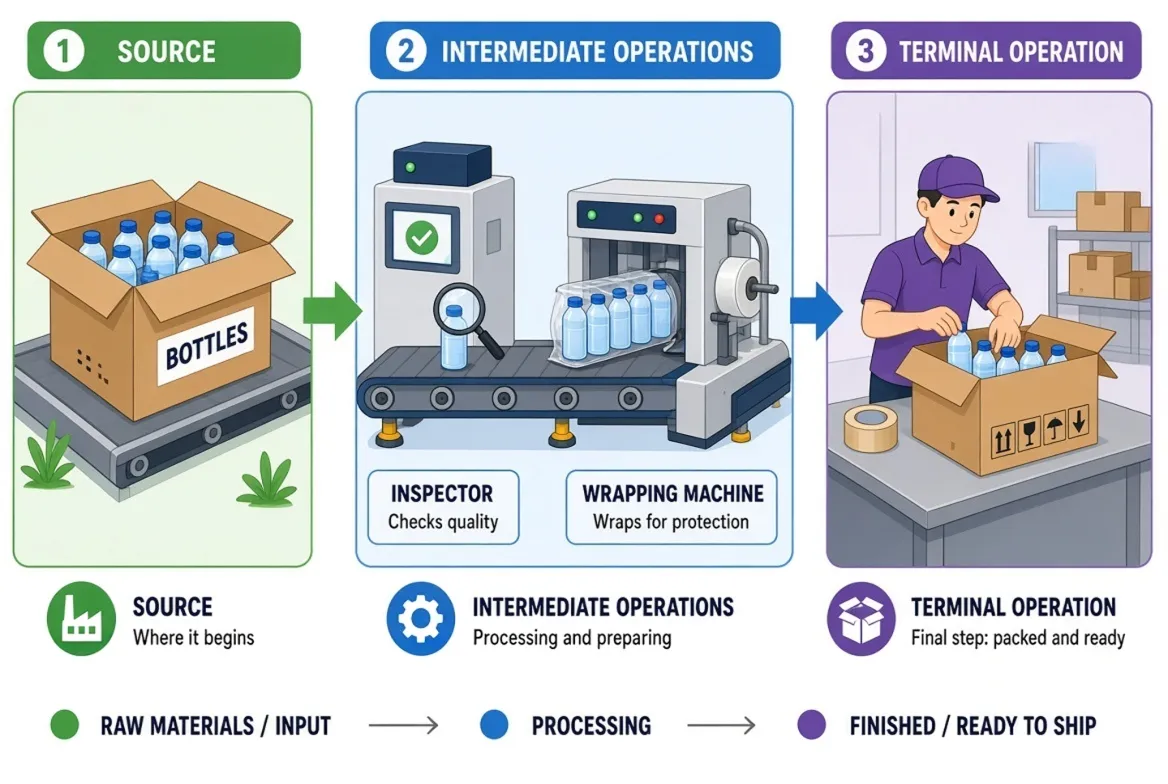
Remember the three things we set up on the belt? A stream in Java has exactly these three parts:
| Part | In the story | In Java |
|---|---|---|
| 1. Source | The bottles you put on the belt | bottles.stream() |
| 2. Intermediate operations | The workers along the belt | filter, map, sorted, distinct |
| 3. Terminal operation | The person at the end of the belt | collect, count, forEach |
Part 1: The Source
This is where the bottles begin their journey. We get a stream from our list with .stream().
bottles.stream()
Part 2: Intermediate Operations (the workers)
These are the workers along the belt. Some examples are filter, map, sorted, and distinct. Each worker does one small job and passes the bottles on.
There are two things to know about them:
- Each worker gives back a stream, so we can chain as many workers as we like.
- Each worker is lazy. Lazy means it does nothing right away. It is like writing a work plan on paper: “Worker 1 will remove damaged bottles. Worker 2 will add labels.” The plan is ready, but nothing moves yet.
Part 3: The Terminal Operation (the person at the end)
This is the person at the end of the belt. Some examples are collect, count, and forEach. This person does two things:
- Tells the belt what final result you want
- Starts the belt
What if there is no person at the end?
Look at this code:
bottles.stream()
    .filter(bottle -> !bottle.isDamaged())
    .map(bottle -> new LabelledBottle(bottle));
// no terminal operation here!
Nothing happens. The belt does not even start.
Think of the story. You put the bottles on the belt and placed all the workers. But nobody is standing at the end to collect. What is the point? The workers would check and label the bottles, but no one would take the finished bottles. All the work would go to waste. So the belt just waits.
Java works in the same way. Because the workers are lazy, Java does no work until you tell it what you want at the end. Once you add a terminal operation, you are saying, “This is my final goal.” Only then does the stream start.
Without a terminal operation, nothing happens. With one, the whole belt starts.
Three ways to end the belt
Here are three people you can place at the end of the belt:
collect(Collectors.toList()): packs all the finished bottles into a box (a list), so you can use them latercount(): a person with a clicker, who only tells you how many bottles reached the endforEach(...): picks up each bottle, does something with it (like reading the label aloud), and keeps nothing
// Way 1: pack the labelled bottles in a box, to use later
List<LabelledBottle> box = bottles.stream()
    .filter(bottle -> !bottle.isDamaged())
    .map(bottle -> new LabelledBottle(bottle))
    .collect(Collectors.toList());

// Way 2: count how many damaged bottles there are
long damagedCount = bottles.stream()
    .filter(bottle -> bottle.isDamaged())
    .count();                                    // result: 2

// Way 3: read every label aloud, and keep nothing
bottles.stream()
    .filter(bottle -> !bottle.isDamaged())
    .map(bottle -> new LabelledBottle(bottle))
    .forEach(labelled -> System.out.println(labelled.getLabel()));
Step 6: Two Golden Rules
Rule 1: A Stream Does Not Copy Your Data
The belt carries your real bottles, not copies.
This means that if a worker changes a bottle on the belt, the change happens on the real bottle in your original list.
Here is the story. A worker picks up a bottle and pours out the drink. Now the bottle is empty. The drink is gone. It does not matter that the bottle was “only on the belt.” It was the real bottle, so it stays empty.
The same thing happens in code. A bottle in Java is an object, so we cannot really make it “empty”. But the object holds a value called filled, and that value is the drink. The worker changes this value to false:
bottles.stream()
    .forEach(bottle -> bottle.setFilled(false));     // the worker pours out every drink
Now every bottle in your original bottles list now has filled set to false. bottles.get(0).isFilled() gives false. The bottle objects are still there, but a value inside each one has changed. The stream copied nothing. It changed the real bottles.
Compare this with map, which makes new things:
List<LabelledBottle> box = bottles.stream()
    .map(bottle -> new LabelledBottle(bottle))
    .collect(Collectors.toList());
Here, a new LabelledBottle is made for every bottle. The original bottles stay untouched. In the story, the worker does not change the real bottle. He makes a new labelled bottle and sends that forward.
A simple rule to follow: use the belt to read your bottles and to make new things. Avoid changing the real bottles.
Also, do not add or remove bottles in your source list while the belt is running. It is like putting new crates on a belt that is already moving. Java does not allow this. Most common lists, like ArrayList, are fail-fast: it keeps count of every change made to it. If the list changes while the stream is reading it, Java notices and stops with a ConcurrentModificationException. This is better than giving you wrong or half-done results without telling you. (A fixed list, like the List.of(...) in our code, does not allow any change, so it throws an UnsupportedOperationException.) So decide your bottles first, and then start the belt.
Rule 2: One Belt, One Use
A stream can be used only one time. After the terminal operation runs, the belt is finished. All the bottles have gone through, and you cannot run the same belt again.
Stream<Bottle> belt = bottles.stream();

long first = belt.count();     // the belt runs: OK
long second = belt.count();    // ERROR: IllegalStateException
The second count() crashes with an IllegalStateException. The message says the stream has already been operated upon or closed.
If you need the result again, start a new belt:
long first = bottles.stream().count();     // a new belt
long second = bottles.stream().count();    // another new belt
This is safe. Your bottles are still in the list, so you can put them on a new belt whenever you like.
Step 7: Grouping Bottles by Flavour
Until now, we put all the good bottles in one box. But sometimes you want to group the bottles by flavour: all the orange bottles together, all the cola bottles together, and all the lemon bottles together. And sometimes you only want to know how many bottles of each flavour you have.
What are we trying to do? Our factory still has the bottles, the belt, and the person at the end. Now we want the person at the end to do two jobs, one after the other:
- Group the bottles by flavour
- Count how many bottles are in each group
By the end of this step, you will see both jobs in code.
Job 1: Grouping
First, we want the groups. In the story, the person at the end now has three baskets, one for each flavour: ORANGE, COLA, and LEMON. When a bottle arrives, he looks at its flavour and drops it in the matching basket.
Map<Flavour, List<Bottle>> bottlesByFlavour = bottles.stream()
    .collect(Collectors.groupingBy(Bottle::getFlavour));
groupingBy is a packing style for collect. It looks at the flavour of each bottle and drops the bottle in the basket of that flavour. If a basket does not exist yet, it makes one.
Bottle::getFlavour is a short way to write bottle -> bottle.getFlavour(). It means: “look at the bottle’s flavour.”
The result is a Map. A Map is a Java box with labels and things inside. Here, the label is the flavour, and the thing inside is the list of bottles. This is what our baskets look like:
| Basket (flavour) | Bottles inside |
|---|---|
| ORANGE | Bottle 1, Bottle 4, Bottle 6 |
| COLA | Bottle 2, Bottle 5 |
| LEMON | Bottle 3 |
Here we grouped all 6 bottles to keep things simple. But you can also add the filter worker before the person at the end, so the damaged bottles never reach the baskets:
Map<Flavour, List<Bottle>> goodBottlesByFlavour = bottles.stream()
    .filter(bottle -> !bottle.isDamaged())                   // worker: remove damaged bottles
    .collect(Collectors.groupingBy(Bottle::getFlavour));     // person at the end: baskets
Now ORANGE holds bottles 1 and 4, COLA holds bottle 5, and LEMON holds bottle 3.
Job 2: Counting in each basket
Now suppose we do not need the bottles themselves. We only want to know how many bottles are in each basket.
In the story, we place a person with a clicker at each basket. Each time a bottle drops in the basket, he clicks once. At the end, we do not get bottles. We get numbers.
Map<Flavour, Long> countByFlavour = bottles.stream()
    .collect(Collectors.groupingBy(Bottle::getFlavour, Collectors.counting()));
Here, Collectors.counting() is the person with the clicker. We hand him to groupingBy as a second item.
So the person at the end now does two jobs, one after the other:
- Group: drop each bottle in the basket of its flavour
- Count: click once for every bottle in each basket
The second job happens after the first one, inside each basket. In Java, this is called a downstream collector. Do not worry about the big name. “Downstream” just means “the next step after this one.”
The result looks like this:
{ORANGE=3, COLA=2, LEMON=1}
So the answer is: 3 orange bottles, 2 cola bottles, and 1 lemon bottle. (The order of the entries may look different on your computer. That is fine.)
To read one number from this result, we use the get method:
Long orangeCount = countByFlavour.get(Flavour.ORANGE); // 3
Small side note:
getis a normalMapmethod. It is not a stream method. There is alsogetOrDefault, which gives a backup value when a flavour is missing. You do not need it to understand streams, so we will skip it here.
The Story Glossary
Use this table whenever you forget a word. It connects our factory story to Java.
| Factory story | Java |
|---|---|
| Bottles waiting at the factory | The List (a collection) |
| Putting the bottles on the belt | .stream() (the source) |
| The conveyor belt | The stream |
| The worker who removes damaged bottles | filter |
| The worker who adds a label | map |
| The work plan on paper, nothing moves yet | Intermediate operations are lazy |
| The person at the end who packs a box | collect (a terminal operation) |
| The box | The result, for example a List |
| The person with a clicker | count() or Collectors.counting() |
| The person who reads each label aloud and keeps nothing | forEach |
| The baskets, one for each flavour | groupingBy (the result is a Map) |
| Pressing the Start button | The terminal operation starts the stream |
| A worker pours out the drink of a real bottle | Streams do not copy data |
| A belt that runs only once | A stream can be used only once |
Quick Recap
- The old
forloop makes us write every small step ourselves. That is the how. - A stream lets us describe the what, as a chain of small jobs.
- A stream has three parts: the source (bottles on the belt), the intermediate operations (the workers), and the terminal operation (the person at the end).
- Without a terminal operation, nothing happens. The belt needs someone at the end, so it knows the final goal.
- A bottle that fails the
filteris only taken off the belt. Your original list stays the same. - Rule 1: a stream does not copy your data.
- Rule 2: one belt, one use.
groupingByputs the bottles in baskets by flavour, andCollectors.counting()puts a person with a clicker at each basket.
The Full Code in One Place
Here is everything from this blog in one file. It has the enum, the bottle, the labelled bottle, and a StreamExample class with a main method. Save it as StreamExample.java and run it.
A small tip: in Java 16 or newer, you can replace the LabelledBottle class with a record. A record is a short way to write a class that only holds values. It does the same job:
record LabelledBottle(Bottle bottle, String label) {

    LabelledBottle(Bottle bottle) {
        this(bottle, bottle.getFlavour() + " Fizz");
    }

    String getLabel() { return label; }
}
In this blog, we keep the normal class, so the code works on older Java versions too.
// File: StreamExample.java
import java.util.List;
import java.util.Map;
import java.util.stream.Collectors;
import java.util.stream.Stream;

enum Flavour {
    ORANGE, COLA, LEMON
}

class Bottle {

    private int id;
    private Flavour flavour;
    private boolean damaged;
    private boolean filled;

    public Bottle(int id, Flavour flavour, boolean damaged) {
        this.id = id;
        this.flavour = flavour;
        this.damaged = damaged;
        this.filled = true;   // every bottle starts full
    }

    public int getId() { return id; }
    public Flavour getFlavour() { return flavour; }
    public boolean isDamaged() { return damaged; }
    public boolean isFilled() { return filled; }

    public void setFilled(boolean filled) { this.filled = filled; }   // changes the drink value

    @Override
    public String toString() { return "Bottle " + id; }
}

class LabelledBottle {

    private Bottle bottle;
    private String label;

    public LabelledBottle(Bottle bottle) {
        this.bottle = bottle;
        this.label = bottle.getFlavour() + " Fizz";
    }

    public String getLabel() { return label; }
}

public class StreamExample {

    public static void main(String[] args) {

        // The six bottles at the factory
        List<Bottle> bottles = List.of(
            new Bottle(1, Flavour.ORANGE, false),
            new Bottle(2, Flavour.COLA,   true),    // damaged
            new Bottle(3, Flavour.LEMON,  false),
            new Bottle(4, Flavour.ORANGE, false),
            new Bottle(5, Flavour.COLA,   false),
            new Bottle(6, Flavour.ORANGE, true)     // damaged
        );

        // Step 3: remove damaged bottles, add a label, pack a box
        List<LabelledBottle> box = bottles.stream()
            .filter(bottle -> !bottle.isDamaged())
            .map(bottle -> new LabelledBottle(bottle))
            .collect(Collectors.toList());
        System.out.println("Bottles in the box: " + box.size());          // 4

        // Step 5, way 2: count the damaged bottles
        long damagedCount = bottles.stream()
            .filter(bottle -> bottle.isDamaged())
            .count();
        System.out.println("Damaged bottles: " + damagedCount);           // 2

        // Step 5, way 3: read every label aloud, and keep nothing
        bottles.stream()
            .filter(bottle -> !bottle.isDamaged())
            .map(bottle -> new LabelledBottle(bottle))
            .forEach(labelled -> System.out.println(labelled.getLabel()));

        // Step 7, job 1: group the bottles in baskets by flavour
        Map<Flavour, List<Bottle>> bottlesByFlavour = bottles.stream()
            .collect(Collectors.groupingBy(Bottle::getFlavour));
        System.out.println(bottlesByFlavour);

        // Step 7, job 2: count the bottles in each basket
        Map<Flavour, Long> countByFlavour = bottles.stream()
            .collect(Collectors.groupingBy(Bottle::getFlavour, Collectors.counting()));
        System.out.println(countByFlavour);
        System.out.println("Orange bottles: " + countByFlavour.get(Flavour.ORANGE));   // 3

        // Rule 2: one belt, one use
        Stream<Bottle> belt = bottles.stream();
        System.out.println("First count: " + belt.count());               // the belt runs: OK
        try {
            belt.count();                                                  // second use: ERROR
        } catch (IllegalStateException e) {
            System.out.println("Second count failed: " + e.getMessage());
        }

        // Rule 1: a stream does not copy data (we do this last, because it changes the bottles)
        bottles.stream()
            .forEach(bottle -> bottle.setFilled(false));                   // the worker pours out every drink
        System.out.println("Is bottle 1 still filled? " + bottles.get(0).isFilled());   // false
    }
}
The order of the entries in the two Map lines can look different on your computer. That is fine.
What’s Next?
Streams have many more machines. We will learn them in the next blog. Here is a small preview, in the same factory:
More machines on the belt
flatMap: open a crate that holds many bottles, and put all of them on the beltsorted: line up the bottles in an order, for example by flavourdistinct: remove repeated items, so each one stays only oncelimitandskip: take only the first few bottles, or skip the first fewmapToInt: turn each bottle into a number, like its size, so you can do maths
More packing stations at the end
anyMatch,allMatch,noneMatch: ask a yes-or-no question, like “Is there any damaged bottle?”findFirst: take the first bottle that fitsminandmax: find the smallest or the biggest onesumandaverage: add up numbers, or find the averagereduce: combine everything into one single valuepartitioningBy: split the bottles into two baskets, like good and damaged
Same factory. Same belt. Just more machines. See you in the next blog!
Learn Java Streams through a simple, beginner-friendly story about a bottle factory. This guide explains the core concepts, the three parts of a stream, and real-world examples without the confusing jargon.